
Local AI, cloud AI, and privacy
Fenn’s default AI runs on your Mac. Optional cloud providers change where questions and relevant file context are processed.
Local processing
Section titled “Local processing”With the Default provider under Settings → Search & AI → Intelligence Level, Agent and Chat use local models.
Your file index is stored on your Mac or the storage drive you choose. Once the required models and files are available, local search and AI processing can work offline.
Internet access is still needed for online features such as model downloads, license checks, updates, and optional cloud services.
Optional cloud models
Section titled “Optional cloud models”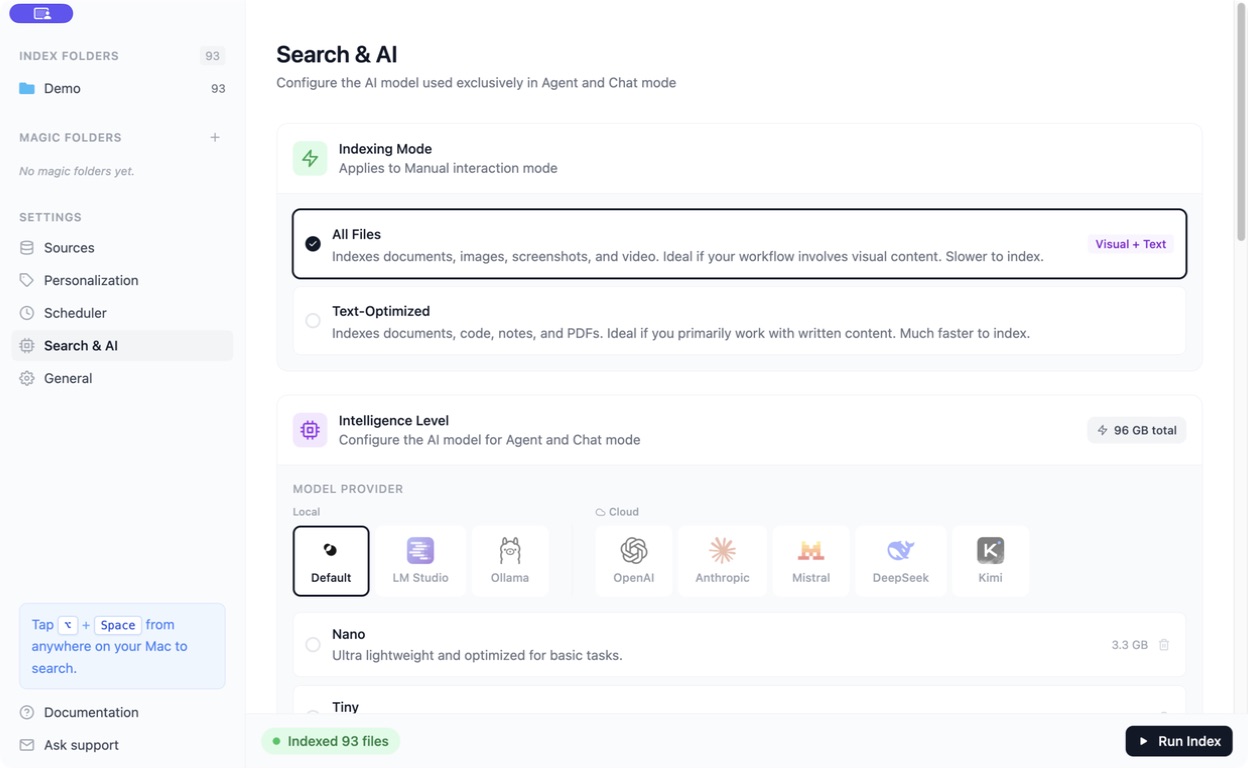
When you select a cloud provider, relevant questions, text, images, and other context may be sent to it. Its account, usage charges, and data policies apply.
A local provider such as Ollama or LM Studio depends on the local server you configure. Choose the provider intentionally rather than assuming every model is local.
Privacy Filter
Section titled “Privacy Filter”For supported cloud configurations, enable Privacy Filter in the provider settings and save.
Fenn masks detected sensitive content locally before sending it, then restores corresponding values in the answer on your Mac. This can reduce exposure, but it cannot guarantee that every sensitive detail is detected.
Use local models when content must remain on your Mac.
The file browser also offers a privacy action for supported files that creates an anonymized copy. Inspect that copy before sharing it; the original remains separate.
Other places to check
Section titled “Other places to check”- Memory: choose exclusions, retention, and whether audio is recorded.
- Personalization: saved context can be included in AI interactions.
- Other AI apps: content returned through an integration is handled by that app and its chosen model.