
Get help and report a problem
A short description of what happened helps us get you back to work faster.
Send the useful details
Section titled “Send the useful details”Email support@usefenn.com, or use Ask support in Fenn’s sidebar.
Include:
- What you were trying to do and what happened instead.
- The exact error message.
- Your Fenn version, macOS version, and Mac model.
- The file type or source involved.
- A screenshot if it makes the problem clearer.
You can describe a problem without sending the original document. Avoid including your license key or private file content in screenshots.
Generate a diagnostic report
Section titled “Generate a diagnostic report”- Open Settings → General.
- Find Diagnostic Report.
- Click Generate and wait for the report.
- Review it, then attach it to your support email if appropriate.
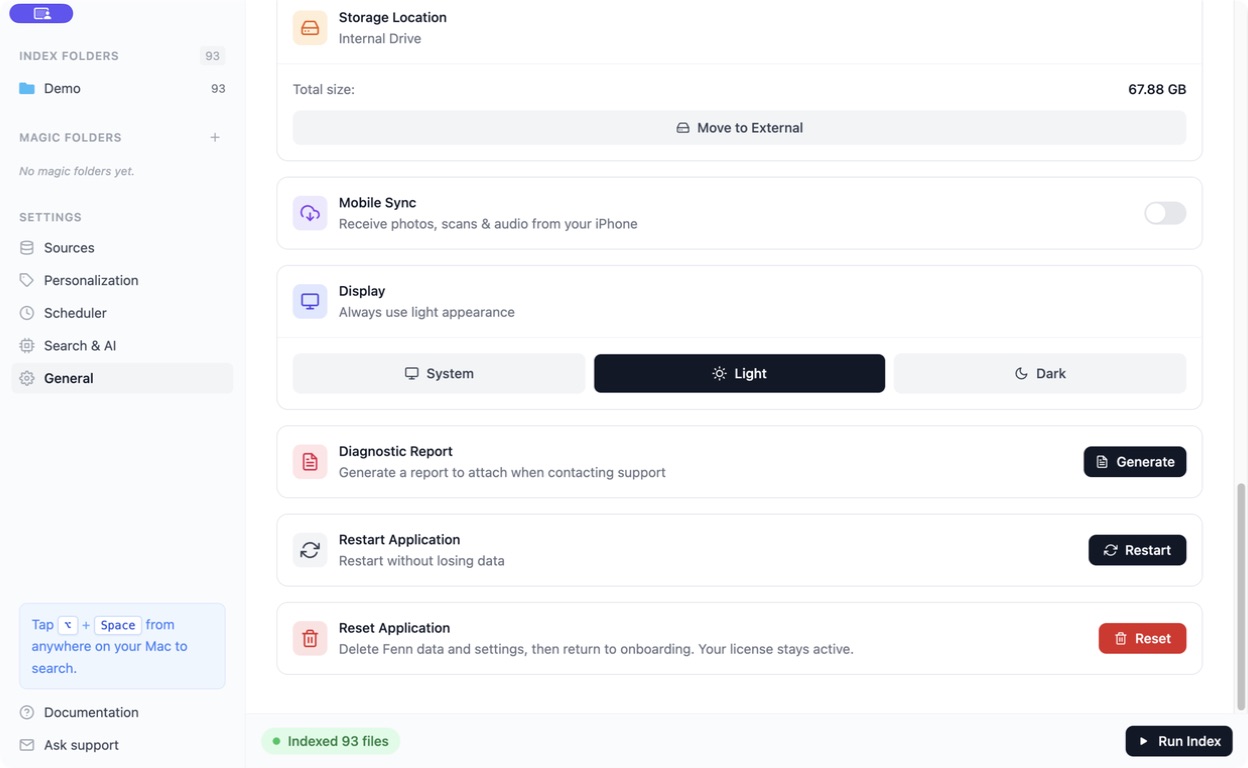
Reports can contain troubleshooting details about your app and environment. Generating one does not itself send a support email.
Common fixes
Section titled “Common fixes”Missing file · Slow or interrupted work · Model download · License activation
Updates, suggestions, and other questions
Section titled “Updates, suggestions, and other questions”Check General → Updates → Check for updates available to your license.
For feature requests, roadmap questions, affiliate information, or integration help, email support. Describe the task you want to accomplish; there is no need to propose a technical solution.