
Keep your files up to date
Indexing prepares your files for search. Run it after adding content, or let Fenn check for changes on a schedule.
Run an update
Section titled “Run an update”Click Run Index at the bottom right of Fenn’s main window.
- Index new files is the usual choice for updating an existing index.
- Full re-index processes files again from scratch. Use it when you need to rebuild the content, rather than for every new file.
- On the first run, Run Index starts preparation directly.
Follow the status at the bottom of the window. Already prepared files can remain searchable while indexing runs, but search and indexing share your Mac’s resources.
Pause and resume
Section titled “Pause and resume”Use Pause when the current operation offers it, and wait for the paused state. Choose Resume to continue. If you need to restart your Mac, pause first when possible, then reopen Fenn and check the status.
Keep your Mac awake and any source drives connected during a run. Closing a MacBook’s lid usually puts it to sleep, so preparation cannot be relied on to continue.
Schedule automatic updates
Section titled “Schedule automatic updates”- Open Settings → Scheduler.
- Turn on Auto-Indexing.
- Choose an interval, daily, weekly, or monthly schedule from the options shown.
- Set the time or frequency and click Save Changes.
- Check Next Run.
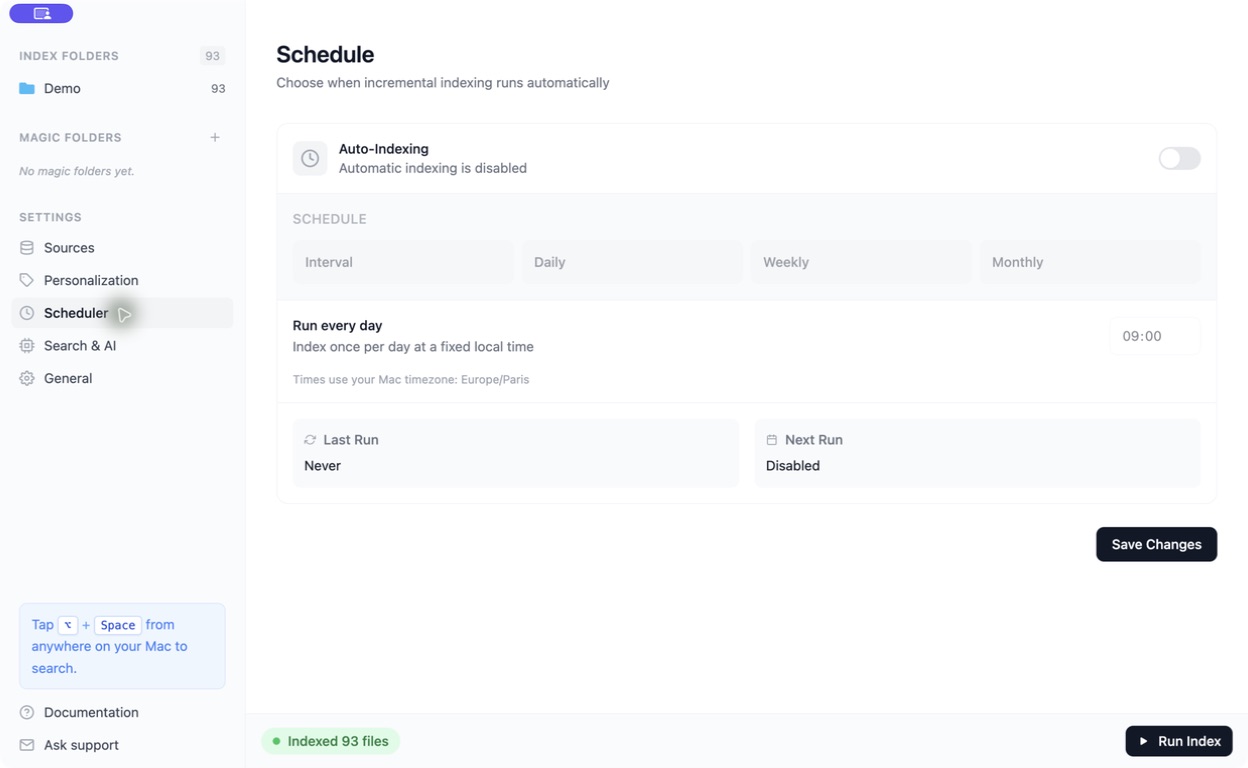
Choose a time when your Mac is awake and Fenn is running. Daily or weekly updates are often enough for a library that changes gradually.